Semantic Caching for AI Agents: What Nobody Tells You About Production
What breaks when you add semantic caching to AI agent workloads. Production data, failure modes, a decision framework, and the checklist we use.
The agent that gave the same answer for six hours
A support triage agent processes inbound tickets. It reads the ticket, classifies urgency, and drafts a routing recommendation. We enabled semantic caching on this agent. Hit rate climbed to 68% in the first week. Cost dropped. Latency dropped. Everything looked great.
Then a customer reported that three tickets about a production outage were all classified as “low priority — general inquiry.” The outage had started six hours earlier. The first ticket about it was genuinely ambiguous — “seeing some slowness” — and the agent correctly classified it as low. That response got cached. The next two tickets — “entire API is down, 500 errors across all endpoints” and “production database unreachable, P0” — were semantically similar enough to the first that the cache returned the same low-priority classification.
The embedding model saw three messages about infrastructure problems. The cosine similarity was above threshold. The cache did its job. The answer was wrong for six hours.
This is the failure mode nobody warns you about. Semantic caching works differently for agents than it does for chatbots, and the differences will cost you if you do not account for them.
What is semantic caching?
Semantic caching is a technique that matches LLM requests by meaning rather than by exact input. Instead of requiring identical strings to produce a cache hit, semantic caching converts each request into an embedding vector, compares it to cached vectors using cosine similarity, and returns the cached response if the similarity exceeds a threshold (typically 0.85-0.95). This allows “What’s our refund policy?” and “How do I get a refund?” to produce the same cache hit, even though they are different strings.
Cache hits skip the LLM call entirely. Zero tokens consumed. Response time drops from seconds to milliseconds. For teams spending $2,000+/month on LLM APIs, a 50% semantic cache hit rate cuts the bill in half.
There is a critical distinction that most guides skip: semantic caching is not the same as prompt caching, and confusing them leads to wrong architectural decisions.
How does semantic caching differ from prompt caching and context caching?
| Semantic caching | Prompt caching | Context caching | |
|---|---|---|---|
| What it caches | Full LLM response | Tokenized prefix (KV cache) | Tokenized prefix (KV cache) |
| Where it lives | Your infrastructure (proxy, gateway) | Provider-side (Anthropic, OpenAI) | Provider-side (Google) |
| Match method | Embedding similarity | Exact prefix match | Exact prefix match |
| Cost on hit | $0 (no API call) | Reduced input tokens (50-90% off) | Reduced input tokens |
| Latency on hit | Milliseconds | Faster TTFT, same generation | Faster TTFT, same generation |
| Risk | Wrong cached response served | None (exact match) | None (exact match) |
| Control | Full (you set thresholds, TTL, scope) | Limited (provider manages eviction) | Limited (provider manages eviction) |
Prompt caching and context caching are provider-side optimizations. They make the LLM call cheaper and faster but you still make the call. Semantic caching eliminates the call. The tradeoff is risk: prompt caching cannot serve a wrong response because it requires an exact prefix match. Semantic caching can, because “close enough” is a judgment call made by an embedding model.
Both are useful. They are complementary, not competing. Use prompt caching for long system prompts that repeat across calls. Use semantic caching for repeated questions across users or sessions. Use both when the workload justifies it.
Why is semantic caching different for AI agents?
Semantic caching behaves fundamentally differently for AI agents than for chatbots. A chatbot is one user, one conversation, one model — if User B asks the same question User A asked, serve the cached answer. The context is shallow and a wrong cached answer is an inconvenience, not a catastrophe.
Agents change this equation in three ways.
1. Agents chain calls — one cache hit prevents many
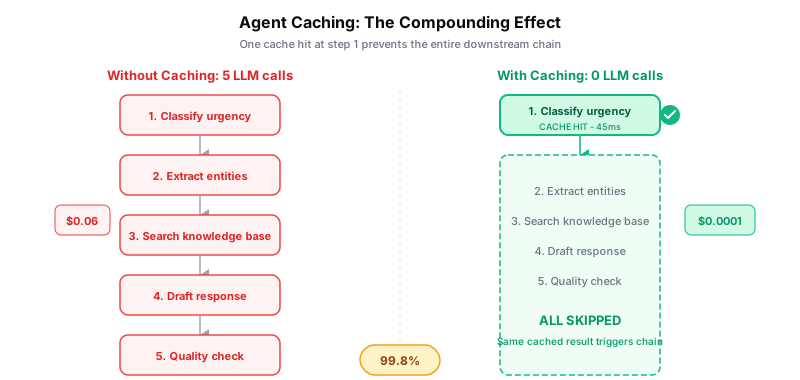
A support triage agent might make five LLM calls per ticket: classify urgency, extract entities, check knowledge base, draft response, quality-check the draft. If the classification step hits cache, you do not just save one call. You save all five, because the downstream calls depend on the classification result. The cached classification triggers the same downstream chain as a fresh one.
This is the compounding effect. In chatbot caching, one hit saves one call. In agent caching, one hit can save an entire tool chain. We measured this across three agent types:
| Agent type | Avg calls per task | Cache hit on step 1 | Calls saved per hit |
|---|---|---|---|
| Support triage | 5 | 68% | 4.2 |
| Docs search | 3 | 54% | 2.1 |
| Code review | 7 | 12% | 1.4 |
The code review agent has low hit rates because every pull request is structurally different. The support agent has high hit rates because customers ask variations of the same questions. The compounding effect means that even a modest hit rate on step 1 produces outsized cost savings.
2. Agents use tools — same tool, different context
When an agent calls a tool like search_docs("refund policy"), the tool call looks identical regardless of what conversation preceded it. Two different agents, in two different conversations, with two different system prompts, might issue the same tool call. Semantic caching sees two identical requests and serves the cached response.
But the conversations are different. Agent A is a billing support agent that needs the refund policy for a customer dispute. Agent B is a compliance agent auditing internal policies. The same tool call, the same cached response, two different contexts where “correct” means different things.
This is why cache key composition matters. The cache key must include the model, the full conversation history, and the tool arguments — not just the tool call in isolation. We learned this the hard way and documented the five defense layers we built to prevent it.
3. Agents run unattended — wrong answers compound silently
A chatbot serves a wrong cached answer and the user says “that’s not right” and asks again. Self-correcting. An agent serves a wrong cached answer and acts on it. It routes the ticket wrong. It drafts the wrong response. It triggers the wrong workflow. And it does this repeatedly, for every similar request, until someone notices the downstream effect.
The six-hour outage misclassification from our opening was not caught by the agent, the cache, or the monitoring. It was caught by a human who noticed tickets piling up in the wrong queue. Unattended execution means cached errors are silent and cumulative.
How much does semantic caching save for AI agents?
We ran semantic caching across five agent workloads for 90 days. The results ranged from 73% cost reduction to a 2% cost increase — the agent type determines everything.
Hit rates by agent type
| Agent | Cache hit rate | False positive rate | Avg latency (hit) | Avg latency (miss) |
|---|---|---|---|---|
| Support triage | 68% | 2.1% | 45ms | 2,800ms |
| Docs search | 54% | 0.8% | 38ms | 1,900ms |
| Slack summary | 41% | 3.4% | 52ms | 3,100ms |
| Daily reports | 23% | 1.2% | 41ms | 4,200ms |
| Code review | 12% | 0.3% | 44ms | 5,600ms |
False positive rate is the percentage of cache hits where the cached response was materially wrong for the request. We measured this by sampling 200 cache hits per agent per week and comparing against fresh LLM responses.
The pattern: repetitive, classification-heavy workloads (support triage, docs search) have high hit rates and justify caching. Creative or structurally unique workloads (code review) have low hit rates and the embedding overhead makes caching net-negative.
Cost impact
| Before caching | After caching | Savings | |
|---|---|---|---|
| Support triage | $285/mo | $78/mo | 73% |
| Docs search | $108/mo | $52/mo | 52% |
| Slack summary | $52/mo | $34/mo | 35% |
| Daily reports | $238/mo | $196/mo | 18% |
| Code review | $572/mo | $584/mo | -2% |
Code review costs went up. The embedding calls for every request — including the 88% that missed cache — added more cost than the 12% hit rate saved. This is the scenario nobody talks about: when your hit rate is below the break-even point, semantic caching makes things more expensive.
The warm-up curve
Day 1 of semantic caching looks terrible. The cache is cold. Every request is a miss. You are paying for embedding calls on top of LLM calls with zero savings. The hit rate ramps over days as the cache fills:
| Day | Support triage hit rate | Docs search hit rate |
|---|---|---|
| 1 | 3% | 2% |
| 3 | 28% | 19% |
| 7 | 52% | 41% |
| 14 | 65% | 53% |
| 30 | 68% | 54% |
Most agents reach steady-state hit rate within two weeks. If you evaluate caching based on the first day, you will conclude it does not work. Give it two weeks of representative traffic before deciding.
Where does semantic caching break with agents?
Multi-step reasoning chains
An agent that reasons in steps — plan, execute step 1, evaluate, execute step 2 — has a dependency chain. Caching step 2’s response is only valid if step 1 produced the same result. If step 1’s output changes (different data, updated context, new information), the cached step 2 response is wrong but the cache does not know that.
We handle this by scoping cache keys to include upstream results. The cache key for step 2 includes a hash of step 1’s output. Different step 1 output means different cache key for step 2. This reduces hit rates for multi-step chains but eliminates cascading errors.
Time-sensitive queries
“What is the current status of order #12345?” has a correct answer that changes over time. A cached response from an hour ago is stale. A cached response from yesterday is wrong. Semantic caching does not inherently know which queries are time-sensitive.
The fix is TTL tuning per agent type. Support agents that handle status queries get 5-minute TTLs. Documentation agents that answer policy questions get 24-hour TTLs. One global TTL does not work for mixed agent workloads.
Domain-specific embedding failures
General-purpose embedding models (like all-mpnet-base-v2 or OpenAI’s text-embedding-3-small) work well for everyday language. They fail on domain-specific content. Two medical queries that a clinician would consider completely different — “dosage adjustment for renal impairment” vs “dose modification for kidney failure” — might score 0.95 similarity because the embedding model treats “renal impairment” and “kidney failure” as synonyms. They are synonyms in general English. They are not synonyms in a clinical protocol context where the specific terminology determines which guideline applies.
If your agents operate in a specialized domain (medical, legal, financial, engineering), test your embedding model against domain-specific query pairs before deploying. Measure false positive rates on domain terminology specifically, not just overall.
Cross-agent contamination
When multiple agents share a cache, one agent’s responses can leak to another. We documented this extensively in our post on tamper-resistant caching — cross-model contamination, context-stripping, and similarity manipulation are all real attack vectors. The short version: cache keys must include the model name, the full conversation history, and tenant identifiers. Anything less creates collision vectors.
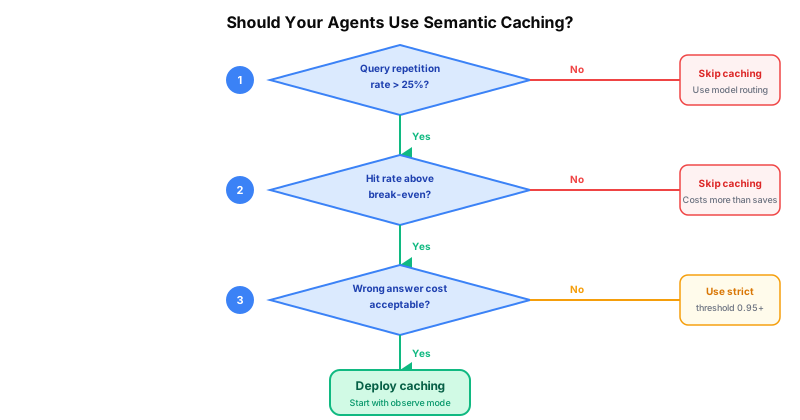
The decision framework: should your agents use semantic caching?
Not every agent workload benefits from caching. Here are four questions to evaluate before implementing.
Question 1: What is your query repetition rate?
Sample 1,000 requests from your agent. Compute pairwise semantic similarity. What percentage of requests have a near-duplicate (similarity > 0.90) in the sample?
| Repetition rate | Verdict |
|---|---|
| >50% | Strong candidate for semantic caching |
| 25-50% | Moderate candidate — test with a subset first |
| <25% | Likely not worth the embedding overhead |
Support agents, FAQ bots, and documentation search typically land above 50%. Code generation, creative writing, and analysis agents typically land below 25%.
Question 2: What is your break-even hit rate?
The break-even point depends on the ratio of embedding cost to LLM cost per request.
Break-even hit rate = embedding_cost / (llm_cost - embedding_cost)Example: if your average LLM call costs $0.012 and the embedding call costs $0.0001, your break-even hit rate is:
0.0001 / (0.012 - 0.0001) = 0.84%Below 1%. Almost any hit rate is profitable. But if your LLM calls are cheap (GPT-4o-mini at $0.00015 per call) and your embedding calls are relatively expensive (a self-hosted model with GPU overhead), the break-even point rises quickly.
Calculate this for your specific workload before committing to infrastructure.
Question 3: What is the cost of a wrong answer?
A cached wrong answer in a docs search agent means a user sees an outdated paragraph. Annoying, not catastrophic. A cached wrong answer in a financial compliance agent means a regulatory violation. The acceptable false positive rate depends on your domain.
| Domain | Acceptable false positive rate | Recommended threshold |
|---|---|---|
| Customer support | <5% | 0.88-0.92 |
| Documentation search | <3% | 0.90-0.94 |
| Internal tools | <2% | 0.92-0.95 |
| Financial / medical / legal | <0.5% | 0.95-0.98 |
Higher thresholds mean fewer false positives but also fewer cache hits. This is the fundamental tradeoff. There is no free lunch.
Question 4: Are your agent responses deterministic enough to cache?
Some agents are expected to produce varied responses. A creative writing agent that generates marketing copy should produce different outputs for similar inputs — that is the point. Caching these responses forces identical output for similar requests, which defeats the purpose.
If your agent’s value comes from response variety, semantic caching is the wrong optimization. Look at prompt caching (cheaper calls) or model routing (cheaper models) instead. We covered model routing in detail in how we cut our API bill by 73%.
Production checklist
If you have evaluated the decision framework and caching makes sense for your workload, here is the deployment checklist we use.
Embedding model selection
Start with text-embedding-3-small (OpenAI) or all-mpnet-base-v2 (open-source). Both are fast, cheap, and produce good general-purpose similarity scores. Do not start with a large embedding model — the marginal quality improvement rarely justifies the latency and cost increase for caching use cases.
Test against your domain. Run 500 representative query pairs through the model and manually label them as “same intent” or “different intent.” Measure precision and recall at your target threshold. If precision is below 95%, consider a domain-fine-tuned model or a stricter threshold.
Threshold tuning
| Starting threshold | When to use |
|---|---|
| 0.85 | High-volume, low-stakes (FAQ, docs) |
| 0.90 | General-purpose (support, search) |
| 0.95 | High-stakes (financial, compliance) |
Deploy at 0.90 and adjust based on false positive rate from your first two weeks of data. Lower the threshold to increase hit rate. Raise it to reduce false positives. Never go below 0.80 — at that point, the matches are too loose to be meaningful.
Multi-tenant isolation
If your proxy serves multiple organizations, the cache key must include the tenant identifier at every layer. Not just the primary key — the embedding index, the metadata filters, and the invalidation scope must all be tenant-aware.
cache:
  key_format: "cache:{org_id}:{sha256}"
  vector_namespace: "{org_id}"
  invalidation_scope: "org"
One org’s cached responses must never leak to another. This is a security requirement, not an optimization. See our post on multi-tenant caching security for the full architecture.
Monitoring
Track these four metrics from day one:
- Hit rate — by agent, by hour, trending over time. If hit rate plateaus below your break-even point, caching is costing you money.
- False positive rate — sample cache hits weekly, compare against fresh responses. This is the quality metric. If it climbs above your domain threshold, raise the similarity threshold.
- Latency delta — cache hit latency vs miss latency. This should be 10-100x. If the gap narrows, your embedding or vector search is too slow.
- Cost delta — total spend with caching vs projected spend without. If this goes negative, you are past the break-even point in the wrong direction.
Invalidation strategy
TTL alone is not enough. Use a layered approach:
- TTL: Set per agent type. 5 minutes for real-time data agents. 24 hours for static knowledge agents.
- Event-driven: When the underlying data changes (knowledge base updated, policy document revised), flush the relevant cache entries. Do not wait for TTL expiry.
- Version keys: Include a version identifier in cache keys. When you update an agent’s system prompt or tool definitions, bump the version. Old cache entries stop matching without an explicit flush.
- Manual flush: Keep a granular invalidation API for incident response. When something is wrong, you need to remove specific entries without nuking the entire cache.
Observe mode
Do not deploy caching straight to enforcement. Run in observe mode first — evaluate cache hits but always serve fresh responses. Compare cached vs fresh for 24-48 hours. Look for false positives. Check quality. Then switch to enforcement.
We built observe mode into our proxy specifically because the first hour of a new cache policy is when most problems surface. The cost of running observe mode (48 hours of full-price LLM calls) is trivial compared to the cost of serving wrong cached responses to production traffic.
What comes after semantic caching? Plan-level caching
Plan-level caching is an emerging approach that caches entire reasoning chains and tool call sequences rather than individual LLM responses. The current generation of semantic caching operates at the individual request level, but agents do not think in individual calls — they think in plans.
A support triage agent runs the same five-step plan for every billing dispute ticket. The plan is: classify, extract entities, search knowledge base, draft response, quality check. If the plan itself is a repeating pattern, why cache individual steps when you could cache the entire plan execution?
This is plan-level caching — an emerging research area. Papers like Asteria (2025) explore caching entire reasoning chains and tool call sequences, not just individual responses. The potential is significant: instead of a 68% hit rate on step 1 that compounds to save 4.2 calls, a plan-level cache hit saves all 5 calls in one match.
We are watching this space closely. The challenges are real — plan validity depends on external state, plan structures evolve as agents are updated, and the similarity matching for multi-step sequences is harder than single-query matching. But the economics are compelling, especially for high-volume agent workloads where the same patterns repeat thousands of times per day.
Key takeaways
-
Semantic caching is not prompt caching. Semantic caching eliminates the LLM call entirely. Prompt caching makes it cheaper. They complement each other.
-
Agents compound cache savings. One cache hit on an early step can save an entire downstream chain. Measure savings per task, not per call.
-
Calculate your break-even point before implementing. If your hit rate will be below the break-even threshold, caching costs more than it saves. We proved this with our code review agent.
-
False positives are silent in agent workloads. Unlike chatbots, agents act on wrong cached answers without human review. Monitor false positive rates weekly.
-
Domain-specific embeddings matter. General-purpose models conflate terms that domain experts distinguish. Test against your domain vocabulary before deploying.
-
The warm-up curve takes two weeks. Do not evaluate caching on day one. Give the cache representative traffic for 14 days before deciding.
FAQ
How much does semantic caching actually save?
It depends entirely on your query repetition rate. In our measurements, support triage saved 73% ($285/mo to $78/mo). Code review lost 2% ($572/mo to $584/mo). The agent workload determines the outcome. Measure your repetition rate first.
Can semantic caching cause hallucinations?
Not directly — it serves previously generated responses, not new ones. But it can serve a correct response in the wrong context, which has the same effect from the user’s perspective. A billing support answer served for a fraud detection query is not a hallucination, but it is equally wrong.
What is a good cache hit rate for AI agents?
There is no universal number. The right metric is whether your hit rate exceeds your break-even point. A 30% hit rate with cheap embeddings and expensive LLM calls is profitable. A 50% hit rate with expensive embeddings and cheap LLM calls is not.
Should I cache tool call responses?
Yes, but with strict key composition. The cache key must include the tool name, the full argument set (hashed), the model, and the conversation context. Tool calls without argument-level isolation are the most common source of cross-contamination. We built an args hash pre-filter specifically for this.
When should I NOT use semantic caching?
When your queries are structurally unique (code review, creative generation), when response freshness matters more than latency (real-time data agents with sub-minute requirements), or when the cost of a wrong answer exceeds the savings from caching (high-stakes compliance workflows with strict accuracy requirements). In these cases, look at model routing or prompt caching instead.
Free guide
The Token Diet: cut the bill before you build the cache
Semantic caching is the deep end. The Token Diet is the shallow end: a free, no-email-required field guide to the AI cost wins you can ship this week without standing up vector search. For the full prefix-caching workflow on a specific stack, the paid playbooks go deeper: Claude Edition and ChatGPT / Codex Edition.
Get The Token Diet (free) →Govyn is an open-source API proxy for AI agent governance. Semantic caching, model routing, budget enforcement, and tamper-resistant security. MIT licensed. Self-host or cloud-hosted.